Showing posts with label Google. Show all posts

New Features In Google or Error May be!

0 comments

In previous weeks Google experimented with new adword's layout in SERP's. They now appear much closer to organic results. People have seen increase click thru rate after this development, however today Google seems to start acting strangely. Previous the bluw bar on which Google displays the competition go to the end of the page, horizontally. However now Google cutting it quite before the end of the page. Here is the screen shot of the new interface. Check the screenshot


Moreover, Previously google shoes the SEarch Prefernce option just beside the search box on home page of google, But now its showing a Search setting option on top right corner.

New Google Sorry Page

0 comments

Google is showing a new page for Sorry Errors. The page now contains a button with I am Human written on it.

Previously there was no button but with a bit of advice on what to do next.

Here are the snap shots of old and new sorry pages

Previous Page:
New Page:

Google SERPs' New Feature - PDF and Books!

0 comments

While researching few days ago, I probably spotted some; actually two new features in Google SERP's.

One is Google showing some additional info for PDF files including Author Name, Year of Document Published, Citation And the Other Version of the document. This feature is something new for me as its not a usual case for PDF files results in Google SERP's. Here is a screen shot of one example. The good thing is that the same thing is appearing for indirectly related results like the page that contain partial information regarding the pdf version.


(Click For Enlarge)

One more feature I spotted recently is regarding Google Book Results in Google SERP's. Although I suspected that this is not new but then I haven't seen anything like that before so for me, its new at least.

This feature include the Author Name, Date Of Publication, Category of the book and the number of Pages. Here is a screen shot of that feature of Google SERP's.


(Click For Enlarge)

Google Images New Feature - Try Also!

0 comments

Now it seems that Google has introduced a new feature in its Image Search. Now its showing the TRY ALSO option below the images that is related searches for that specific image. Although one more thing to notice is that Google is showing MORE FROM option that appears to grab th images from the place where its hosted rather than the website it appears. So is this the end of hot linking???

Here is an image of that new feature in Google image Search


(click to enlarge)

And don't ask me that why on the earth I was searching for cat eyes :P

New Feature By Google For link: Query!

0 comments

As we all know that recently Google completely shut down its link: query. But today while doing some research I come across with this new feature or may be bug by Google.

When you use info:domain.com command in Google, it verifies a website authenticity. At the same time it also shows you some further options i.e.

Google can show you the following information for this URL:

  • Show Google's cache of domain.com
  • Find web pages that are similar to domain.com
  • Find web pages that link to domain.com
  • Find web pages from the site domain.com
  • Find web pages that contain the term "domain.com"


In past, on clicking "link to" command, google shows you the links pointing to that domain by using link: query. but if you click it now, its also showing a strange code with link: query
The whole query looks like this now..

link:CODE:domain.com

One thing I noticed is the code is dedicated for each individual site. If you change the domain.com section with some code dedicated to some other site...it will shows the same results. Note that its still not showing the backlinks. Here are the screen shots of the new feature by Google

Search info:domain query first, it will give you the following result(click for enlarge)


Now Click the "link to" command(click for enlarge)

Google Image Search New Feature - Local Results Box!

0 comments

Recently reported by Matt McGee at SearchEngineLand regarding Google showing local results for non local queries. Recently I did an image search and find something new(again :P)..

Google is now showing an option to see localized results for food(i haven't tries other queries, may be its for general). It is now showing a search box to enter your city name or zip code and it wills how you the images related to that city or area.


And here is another one..yes a pizza search

New Feature In Google Images Search

0 comments

Google is testing a new option in its image search(remember yahoo has update its images search some days ago..hmmm)

You can now sort the images according to color. A very unique feature introduced by Google. I guess many of us knows that Google has submitted a patent regarding reading the images. Here reading means what actually image is in image, regardless of file name or alt tag.
Now we have more options for image optimization.

Here are the screen shots of this new feature in Google Images.


Here is the RED COLOR option


And here is Green one

Backlinks VIa Google link: Operator!! Dream On Buddy...

0 comments

Finally Google has stopped showing ANY backlink with legendary link: operator.

Previous it has been observed that Google has restricted to show only a chunk of evaluated back links but now its simply not showing any single backlinks evaluated or not evaluated. So now all we have is Yahoo Site Explorer and other third party tools for competitor analysis. Here are some screen shots I took for showing you guys the exactly what i mean. (Click on the images to enlarge)


Here is Another one:


And one more...


As you can see there is not one single backlink in the results, the idea of Google to stop showing the info to some third person is finally done.

Two New Features In Google SERP's

1 comments

There are two new features pointed recently in Google SERP's. One is by Seobiza bout the third indent. Normally Google shows two indent for a website if it thinks that there are more than one page related tot he searched words but now its showing three.


Go here for story: Link

the other one is found be me. Its Google showing the internal links of a website after description or snippet in SERPS. Look here what i mean


Here is another one


PS: It seems that these links are termed as Mini Site Links.

Google New TIp - Do Not Include The Word!!

5 comments

In recent days I have come across several search results where Google is showing the

Tip: These results do not include the word "WORD".

at the end of the results. Its also showing an option via which you can see the results which contain that specific results.

Question is..
Why Google is neglecting some specific word in a phrase?

Its not that the word doesn't appear cause Google is showing an option to see the results with the word included.

Here is an example(click to enlarge)


google error

Google Bread Man

0 comments


Google Calculator Error...!!!

3 comments


Click For Enlarge

Here is the url: Google error url

Here is the Query: 399,999,999,999,999 - 399,999,999,999,998

Google Changes Image Result Layout!!

0 comments

So Google has finally changed the Google Image Results Layout. Now its perfectly copying Microsoft Image results. Here is a screen shot of New Google Image Result UI.


Google has introduced some new feature like File Type And Color as well as searching the image from some specific website.

Google Enhance Its Cache Showing Feature!

2 comments

Google has enhanced its cached showing feature. Instead Of showing Yellow high-Lighting's Its now showing the text in more structured manner. Here is the snap show of new enhance cache showing format.


Click the image to Enlarge it.

May be Google has update its cache features too.

Google Favicons Story - The Other Google Favicon's!

4 comments

A favicon, acronym of favorites icon, also known as a website icon, page icon or url icon. This small icon is associated with a particular website or web page and represent it.

The standard size of favicon is 16 x 16. To display a favicon you need to add a rel attribute in the head section of website and it usually place in the root directory. In Internet Explorer 7+, Mozilla Firefox, Opera and Safari favicons are displayed in all available tabs

Ok Enough.

Its not long ago that Google change its main Favicon. The old Favicon is a Capital G in a box, but the new one is small purple g.

So I decide to collect all the FAVICONS of the services or websites that are owned by Google. I am not sure that I got all of them but these are the maximum I can find. And Yup I do found some interesting stuff too. :)

GOOGLE CURRENT FAVICON


GOOGLE OLD FAVICON


These Pages are still showing the Old Google FAVICON.

https://adwords.google.com/support/
http://checkout.google.com/support/

The internal Pages from these pages also shows the same old Google Favicon.

NO FAVICON:
Yes these are the pages which don't have any Favicon.

http://picasa.google.com/support/?hl=en
http://sketchup.google.com/support/?hl=en
http://earth.google.com/support/?hl=en

PRODUCT BASED FAVICON:

Google Docs


Google Pages


Youtube


Blogger


Google Desktop


Orkut


Gmail


Here is the Google Help Center Page from where you can see the Products Google Offers. LINK

Google Adword Keyword Tool Update!

3 comments

Google has Updated its Google Adword Keyword Tool. It now showing the Approx Search Volume in numbers rather than in Green bar.

Here is the screen shot of old Google adword keyword tool.


And here is the new Adword Keyword Tool Snapshot


Here is the help guide to the sections showing in Google Adword Tool,

  • Web traffic is influenced by seasonality, current events, and a number of other factors. The level of search volume on your keywords, therefore, is constantly fluctuating.
  • Location and language targeting: If you access the Keyword Tool from within an ad group, the search traffic statistics will factor in your campaign's country and language targeting (if you target a region or city, only the country will be reflected). If you use the standalone or external Keyword Tools, your country and language selections will influence these statistics. Learn about the different variations of the Keyword Tool.
  • Match type: The Keyword Tool's statistics vary depending on your selection from the Match Type drop-down menu. If you select Broad or Phrase, the tool will factor in certain variations of your keywords that could potentially trigger your ads. Learn about keyword match types.
For More Help, Here is the page, LINK.

And Hey,

Google Adowrd Keyword Tool is still showing the old Google FAVICON. RITE ??

Google Suggestion Gone Wild!

8 comments

Here are some coolest suggestion given by Google to there user. Enjoy!

http://seoz87.googlepages.com/googlesuggestion.png

Google Page Rank

1 comments

Google Page Rank..the green bar on Google tool bar ranking the web page by giving it points from 10. Ever wonder what is its purpose? Why it is so important(IT IS IMPORTANT)? Why one want 10 out of 10 (OK its a real tough task nearly impossible) or want an increase in it? These and many more questions about Page Rank are constantly raised by many peoples and SEO’s too. Here is a “summary”(not the same article) of most comprehensive study originally done by smashing magazines about Google Page Rank. The most kool thing about this article are the tools that provided with the article about Page Rank. Read it and see that what you know about Page Rank till now is rite or…?

What is PageRank?
It is one of the factors that Google Use for measuring importance of a page. Moreover it has nothing to do with page quality or topic relevancy. Its only measure the importance of a page by counting how many links that page got.


“Google uses many factors in ranking. Of these, the PageRank algorithm might be the best known. PageRank evaluates two things: how many links there are to a web page from other pages, and the quality of the linking sites. With PageRank, five or six high-quality links from websites such as www.cnn.com and www.nytimes.com would be valued much more highly than twice as many links from less reputable or established sites.”
By Google Librarian Central

How Does PageRank work?
Ok this thing is still under study (obviously by SEO’s) How that things work. An equation is derived to calculate how it works or how it ranks a page. Here it is

PR(A) = (1-d) + d(PR(t1)/C(t1) + … + PR(tn)/C(tn)).

That’s the equation that calculates a page’s PageRank. In the equation ‘t1 - tn’ are pages linking to page A, ‘C’ is the number of outbound links that a page has and ‘d’ is a damping factor, usually set to 0.85.

One thing is also said that If a page got PR 10 and it got only one link on it than this link will get the wholw link juice and get a fair amount of PR too. So having a link on a page with greater Pr is important but number of links on that page is also important.

Since Google Page Rank is logarithmic in its calculation so each Page Rank level is progressively harder to reach. If it takes 10 steps to reach for PR1 than it will take 25 steps to reach for PR 2. Page rank update after every 3 or 4 months. Here is another interesting thing about Page rank is..

“PageRank is based on incoming links, but not just on the number of them. Instead PageRank is based on the value of your incoming links. To find the value of an incoming link look at the PR of the source page, and divide it by the number of links on that page. It’s very possible to get a PR of 6 or 7 from only a handful of incoming links if your links are “weighty” enough”

FACTORS EFFECTING AND NOT-EFFECTING PAGE RANK

  • Inbound Link
  • Adding Pages Decrease Page Rank
  • Decrease in Page Rank of Pages that have link of your website
  • Links from and to high quality related sites
  • Content updates don’t improve PR
  • Content is not taken into account when PageRank is calculated
  • Page Rank doesn’t consider site age, backlink relevancy and backlink duration.
  • Wikipedia Links don’t improve Page Rank after they implemented NO FOLLOW TAG .
  • Listing in DMOZ and Yahoo! doesn’t give your site a special PR Bonus
  • .edu and .gov-sites still contraversal
  • Links marked with nofollow-attribute don’t contribute to Google PageRank.
  • Links from one page to itself don’t improve Page Rank
  • Bad incoming links don’t have impact on Page Rank
  • Dangling links(links that point to any page with no outgoing links) don’t have impact on Page Rank.
  • Efficient internal linking
  • Anchor text
  • Links from top ranked pages in Google
google page rank

GOOGLE PAGE RANK RELATED TOOLS

All Pages PR
All Pages PR of your website in simple text format

Page Rank From Different Data Centers
Page Rank on different 30 data centers plus genral info about website

Page Rank Calculator
A calculator to determine share of Page rank

Live Page Rank
See the Live and current Page Rank for a website.

Google Backlink Query.. With Space Without Space ?

1 comments

So we are (Ok ME) still having problems with info that Google is showing us about our sites.

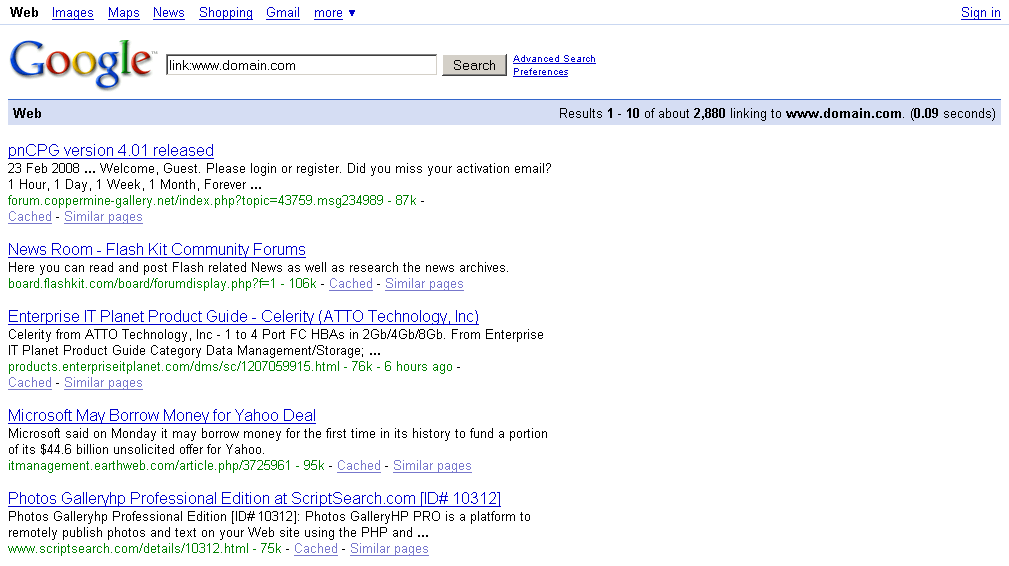
At Google Cheat Sheet or Google Advance Operators page, Google tells us a way to check links, a website have or more commonly known as back links. According to it you can check your website / web blog back links (ok a chunk of your website back links) by typing in the following query in Google.

link:www.domain.com

but if you search
link: www.domain.com
(Note: there is a space between : and url)

You will get an entirely different number of links.

Here is the images. You can see the visible different number of links.

WITH SPACE: | WITHOUT SPACE:
Click Here For Image | Click Here For Image


Those two queries shows a different number of same thing i.e. back links. Moreover if you are sign in with your Google account its shows you different number of links compare to when you search without signing in with your account.

So what is the reason behind it? Anyone knows?

PageRank Is Changing!

0 comments

The green bar is on move again! PageRank updation has been started.

According to Wikipedia,
PageRank is a link analysis algorithm that assigns a numerical weighting to each element of a hyperlinked set of documents, such as the World Wide Web, with the purpose of "measuring" its relative importance within the set.
Many of my clients website got an increase in there page rank in recent days. Though some of the internal pages got a decrement too.


These changes in result noted within previous week.

Anyone else got there pagerank increase or decrease?